
Never lose "what did they say?" again.
Decisions in meetings, promises on calls, small talk you'll want to recall. The moments worth remembering usually happen when you're not taking notes.
How it works
- 1Tap Start recording on your Watch
- 2It sends recordings every 10 minutes
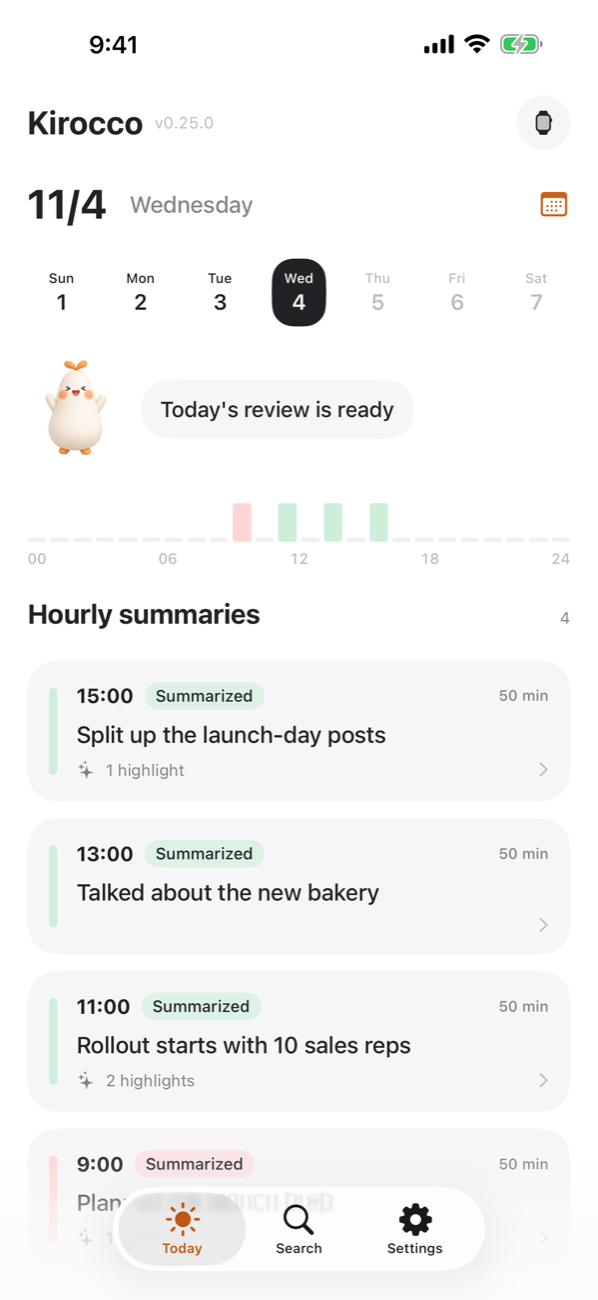
- 3Hourly summaries arrive on your iPhone

What you get
- Hourly summaries with highlights
- A daily review and to-dos in the evening
- Search the last 31 days by keyword to find that moment
- Replay audio from any moment
- Register your voice to label "Me" and "Other"
- See at a glance on your watch face whether you are recording
- Export each hour's transcript and summary as a .txt file
Finished days are sealed. Even we can't read them.
Once the daily review and summaries are done (within 3 days at the latest), records for finished days (transcripts, summaries, audio) are sealed with a key that lives only on your devices. Without it, no one can read them, including our administrators (except audio sent to ElevenLabs for transcription, which may be kept under their own policy).
Until they are sealed, recordings are processed on our servers and sent to ElevenLabs (transcription, in the US) and an AI for summaries (OpenAI, or Google depending on our settings), with ElevenLabs set not to use them for training and OpenAI set not to store them.
Any attempt by a person to read records is logged and alerts our staff. Original audio is deleted after 30 days.
Record all day. Pay only for time spent talking.
Silence isn't counted. New subscribers can try a paid plan free for 7 days (no limit during the trial). Yearly plans are 40% off.
Free
Just trying it out
3 hrs / month
¥0
Light
A few meetings
30 hrs / month
¥2,980 / month
Standard
Meetings every day
80 hrs / month
¥5,980 / month
Premium
Talking all day for work
150 hrs / month
¥9,800 / month
Be considerate
Recordings include other people's voices. Please let people around you know you're recording. The app also reminds you before your first recording.
Requirements
Apple Watch (watchOS 11 or later) and iPhone (iOS 18 or later). Available in English and Japanese.
FAQ
- Does recording resume automatically?
- No. If a call or Siri stops it, tap again on your Watch (the Watch lets you know when it stops).
- How do I delete my data?
- Use "Delete account" in the app's Settings at any time.
- What if I lose my key?
- Use the recovery code you save at the start. If you lose both the key and the code, no one can open your records.